Step 1
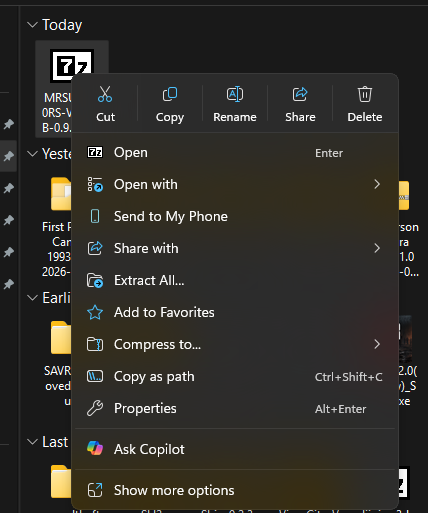
Right-click the VR HUB ZIP
Find the downloaded MRSURVIV0R'S VR HUB ZIP file and right-click it.

MRSURVIV0R'S VR HUB is the best way to install and manage the VR mods I currently support. The HUB brings supported games into one app with guided setup, game detection, cleaner install flows, full mod uninstall support where available, and built-in update checks so you are not stuck hunting for the latest version.
MRSURVIV0R'S VR HUB 0.9.96.1 adds Turok VR and improves Titanfall 2 installer updates and verification. Open the VR HUB Game List for the full supported-game and platform breakdown.
Note: Any additional mods installed on top of the VR setups provided through the HUB are at your own risk!



Set up VinceCrusty’s Turok VR mod for the current Steam remaster, with guided installation and mod update notifications.
Check for Update is now available in Titanfall 2’s game area, including at VR Ready. Improved checksum verification recognizes published GitHub installer releases.
Includes the new PCVR and Meta Quest games, live game-card search, the PCVR Games Only filter, and GitHub-based HUB updates with What’s New, Update Now, and Update Later.
Pokémon / DramaticShapeVR is temporarily hidden following the removal of its GitHub repository. AVP PCVR remains unavailable for maintenance; AVP Quest remains available.
I did not make the REFramework, or the VR motion controlled mods for RE4 and RE9. REFramework was made by Praydog, and the RE4 & RE9 motion controlled mods were made by Talemann1982. I just made the installers, and REFreamwork Nightly Updater that's it. I would appreciate it if no one said otherwise, too. Please show Praydog & Talemann1982 love for all of their hard work!!!
This only takes a few seconds. Windows can mark downloaded ZIP files as coming from another computer, which may prevent the VR HUB from installing or opening correctly.
Only do this if you downloaded the VR HUB through this site or the official MrSurviv0r/MRSURVIV0R-S-VR-HUB GitHub releases page.
Find the downloaded MRSURVIV0R'S VR HUB ZIP file and right-click it.
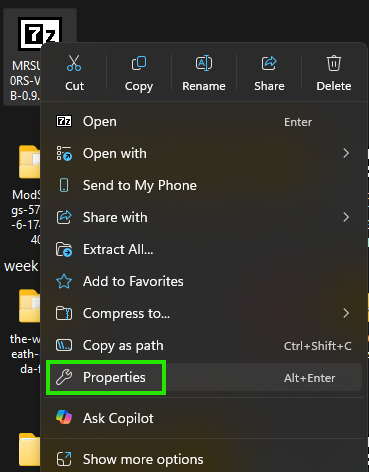
Choose Properties from the right-click menu.
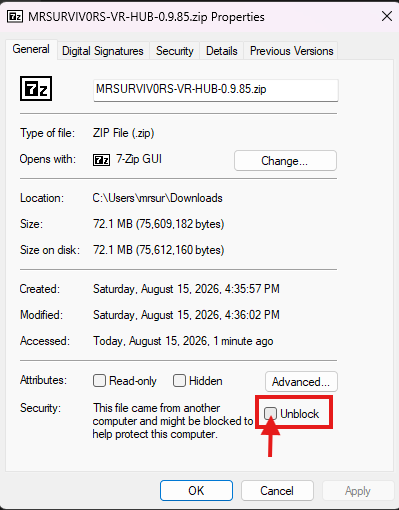
On the General tab, look at the bottom of the window and check Unblock.
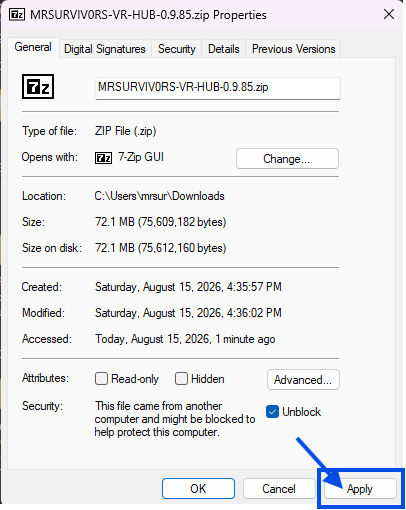
Click Apply, then OK. After that, extract the ZIP again and run the VR HUB.
Release 0.9.96.1 · Download hosted on GitHub
Turok VR joins the catalog, with improved Titanfall 2 installer handling and all the features from 0.9.96.
Ready or Not VRO is now part of the supported game list inside MRSURVIV0R'S VR HUB. The HUB helps keep the setup cleaner by guiding you through the VRO pak install, Steam launch option choice, and uninstall process without needing to manually track every step yourself.
This quick video walks through the Ready or Not VRO setup using the HUB, including the important DirectX 11 launch option and the VR start choice.
DLSS Swapper is an open-source tool designed to allow users to easily swap between different versions of NVIDIA's Deep Learning Super Sampling (DLSS) technology in games. This tool enables gamers to optimize their gaming experience by upgrading or downgrading the DLSS version used in a game, which can improve performance, image quality, or compatibility.
NVIDIA Profile Inspector Revamped (NVPI-R) is a forked tool with more documented settings & features. NVPI-R is a tool that lets you tweak hidden NVIDIA parameters not exopsed by the NVIDIA control panel or app, allowing you to fine tune your experience.
The original VR HUB walkthrough covering the basics of the app, the guided setup flow, and how to install the supported Resident Evil VR games through the HUB.
A quick look at the HUB 0.9.50 update, Silent Hill 2 support, the first UEVR game added to the HUB, and the supported VR mod setup experience.
A quick look at the HUB 0.9.53 update, Silent Hill 2 support, the first UEVR game added to the HUB, and the supported VR mod setup experience.
This video shows the process for all 4 NEW games added to the HUB in this release
This video shows the process for all 3 NEW games added to the HUB in this release
A walkthrough of the VR HUB 0.9.62 update, including Atomic Heart support and the optional PureDark UEVR AFW renderer choice added across supported UEVR games.
A walkthrough of the VR HUB 0.9.64 update, including three newly supported games, dynamic release information, and the official FLAT2VR Studios catalog.
A walkthrough of the VR HUB 0.9.65 update, which added guided Halo MCC VR support for both Halo 3 and Halo 3: ODST.
A walkthrough of the VR HUB 0.9.81 update and its guided Cyberpunk 2077 VR support, including the cleaner installation path added directly to the HUB.
A walkthrough of the VR HUB 0.9.90 update, including the new supported games and update-handling improvements added in that release.
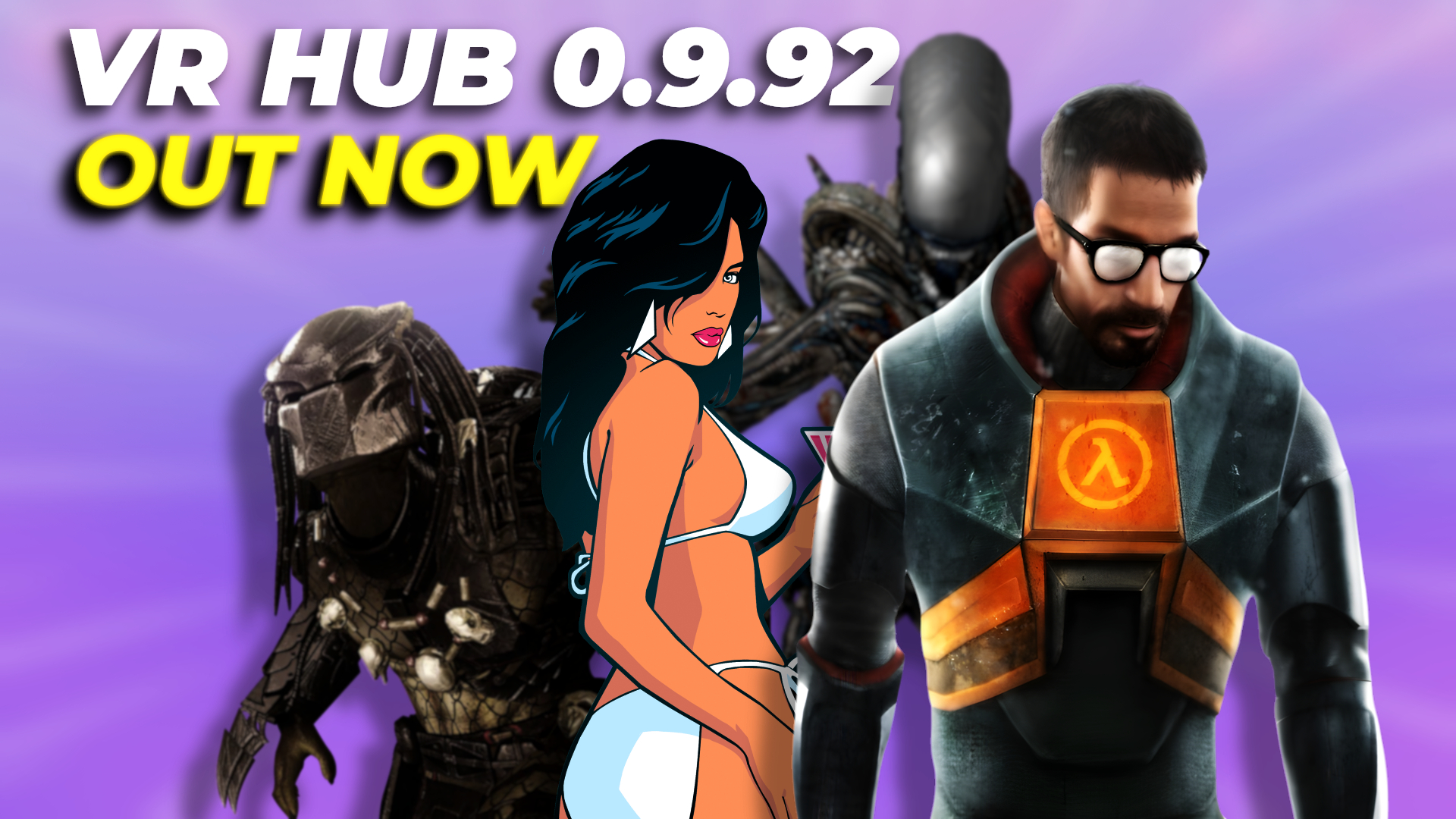
The previous VR HUB 0.9.93 update overview, covering the standalone Meta Quest additions and the SourceVR and Simpsons update improvements from that release.
The VR HUB 0.9.94 update overview covering the new DOOM (2016), F.E.A.R. VR and DramaticShapeVR Quest support plus the updated Halo MCC VR release workflow.
HoriZon's site is an excellent resource for troubleshooting issues, tips & tricks while also providing links to other mods that you can play with the VR mods. Check it out!
UploadVR interviewed me regarding the installers which was something I did NOT expect. Check out the article if you have time.